Introduction
Although I haven't had a ton of time in my new role at Sendmarc as an Email Security Analyst, I have had some real work to do. This means I have to do two things at once.. learn and produce.
This is perfect for me because it gives me the opportunity to make the most difference, find things that take a long time or don't require a ton of expertise, and free up others to do what they do best.
Many of the tasks I get that aren't client facing or overly abstract can be done far easier with automation. This article walks through some of the ways I have partially offloaded or streamlined those processes with AI.
I want to clarify something early on: I am not an AI engineer or a professional software developer. I am a new cybersecurity professional trying to add more value than my experience on its own would normally allow.
Some of the most repetitive tasks I faced included:
- DNS lookups
- task tracking
- repetitive security tasks
- peer reviews
- organizing large amounts of data
None of these tasks are especially difficult, but they take time, consistency, and accuracy.
The more repetitive the work became, the more I found myself needing to add efficiency.
The Thought Process
I've never gotten formal training on iterative processes, but I realized quickly that I was in a great spot.
I don't really have limits on how quickly I can test and improve things I create, so I started using a very specific process whenever I found inefficiency in a large task.
The process looks something like this:
1. Identify the Problem
I find something repetitive, slow, disorganized, or annoying enough that it feels like it could be improved.
2. Build a Rough Solution
Using AI I create a rough working version using things like:
- Python
- APIs
- Artifacts
- MCP tools
The first version is usually not anything to write home about.
3. Use It Repeatedly
This is mandatory!
I actually use the tool during work over and over again.
4. Find Friction
While using it, I notice:
- clutter
- inefficiency
- unnecessary information
- missing options
- things that just feel awkward
This is definitely the most meaningful part of the process.
5. Improve the Workflow
I go back, make changes, remove things that don't help, and improve things that do.
Sometimes the improvements are tiny and sometimes they completely change how useful the tool becomes.
6. Repeat
Over time the improvements become less obvious, and that's when I know the tool is actually useful.
The important thing to understand is that this process is definitely not faster (initially) than just doing the work manually.
But after enough iterations, this new solution becomes far better than the original process.
Examples
The easiest way to explain this process is through a few real examples from my day to day work.
DNS / MCP
Within my role, I don't only do email security work. I also get the opportunity to support some of the sales side.
Part of that involves reviewing potential customer domains using DNS information.
Things like:
- MX providers
- DMARC policies
- DKIM configurations
This information gets organized into files where it can later be sorted, filtered, and analyzed to highlight organizations that are in need of DMARC or DMARC improvement.
The problem was that the process was repetitive and often lacked specific advice because manually reviewing large numbers of domains takes a lot of time. It's one thing to do 10 domains but 400.. is something else.
Another major time sink was peer reviews.
A huge part of Customer Success work involves making changes to customer accounts:
- DMARC policies
- percentages
- rua + ruf addresses
- policy configurations
And there are an incredible number of small things that can be missed.
At first I used lookup tools and manual reviews, but once you're reviewing changes across 80+ domains, it becomes very hard to audit consistently without eventually overlooking something.
So I started experimenting with MCP servers after being introduced to them through UAlbany's Cyber Defense Organization.
Without getting into too much detail, I was able to connect Claude to a DNS lookup tool through an MCP server running in my home lab.
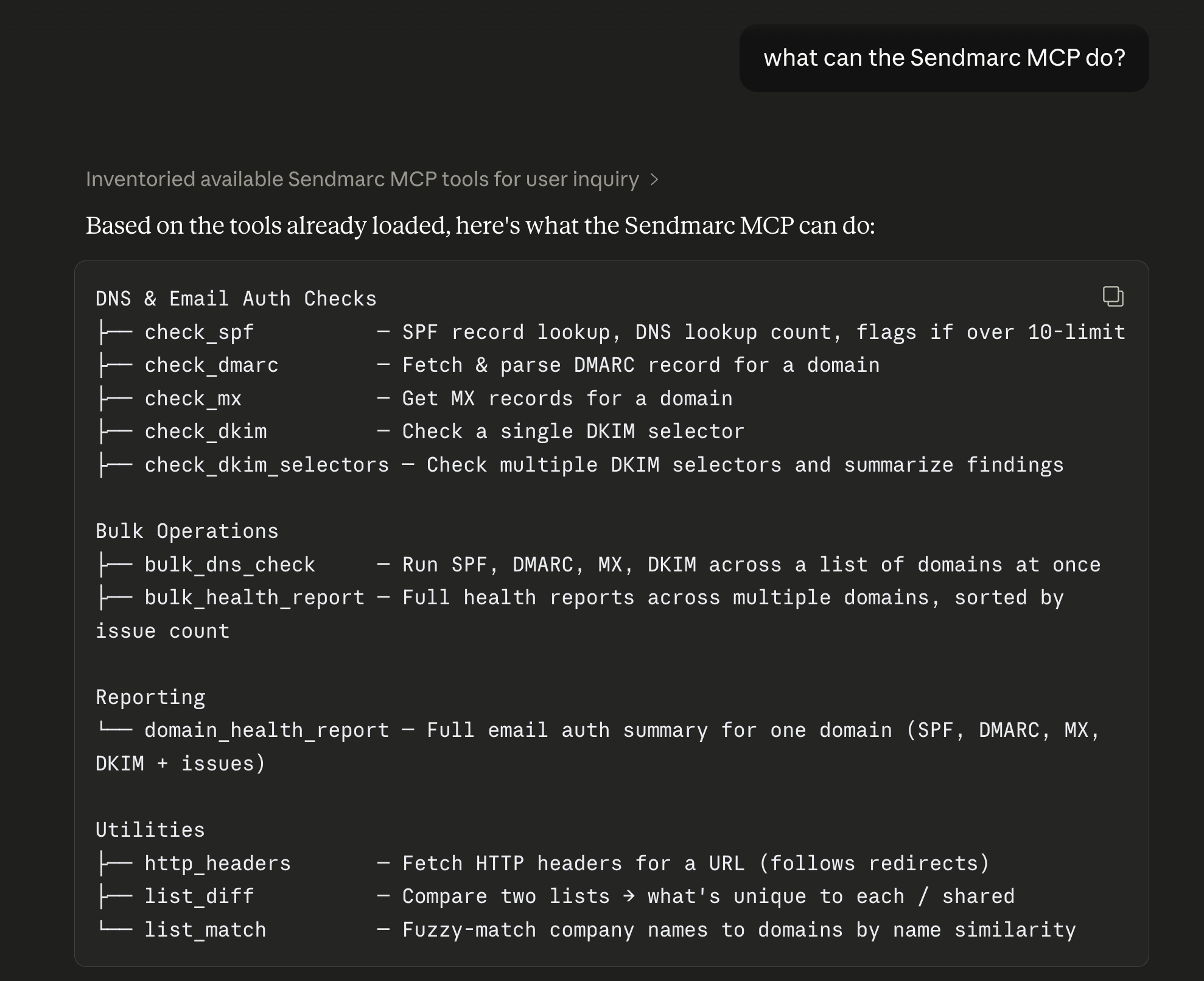
Initially, this worked perfectly.
Then an attempt to scale showed another weakness.
A full DNS health check across 400+ domains produces a massive amount of information.. believe it or not.
At that point, more information stopped being useful because it was drowned out by DNS fluff.
So instead of using full DNS lookups, I added functions to hone in on the fields I cared about most:
- DMARC policy
- SPF lookup count
- MX provider
- RUA address
Removing unnecessary information made the tool faster and more useful.
My goal in all of this wasn't to automate the way I thought or give that control over to AI. It was to find the ways AI can streamline the work I can do. Just slowly.
It has been really exciting using my own MCP server because it gives me the ability to automate tasks in ways I couldn't do with Claude's sandbox environment.
Task List / Workflow Design
Being new to remote work came with challenges that I didn't expect. One of these being organization. My notes became messy, tasks slipped my mind, got lost on the paper, or random thoughts had nowhere to go. At first, I used a very simple task list. Then over time I kept feeling like something was missing while using it. Progression was needed!
This progression looked something like this:
Simple task list
Added subtasks
Added expandable notes
Added scratchpad area
Added priority flags
Removed features that cluttered up the Artifact
Improved organization repeatedly
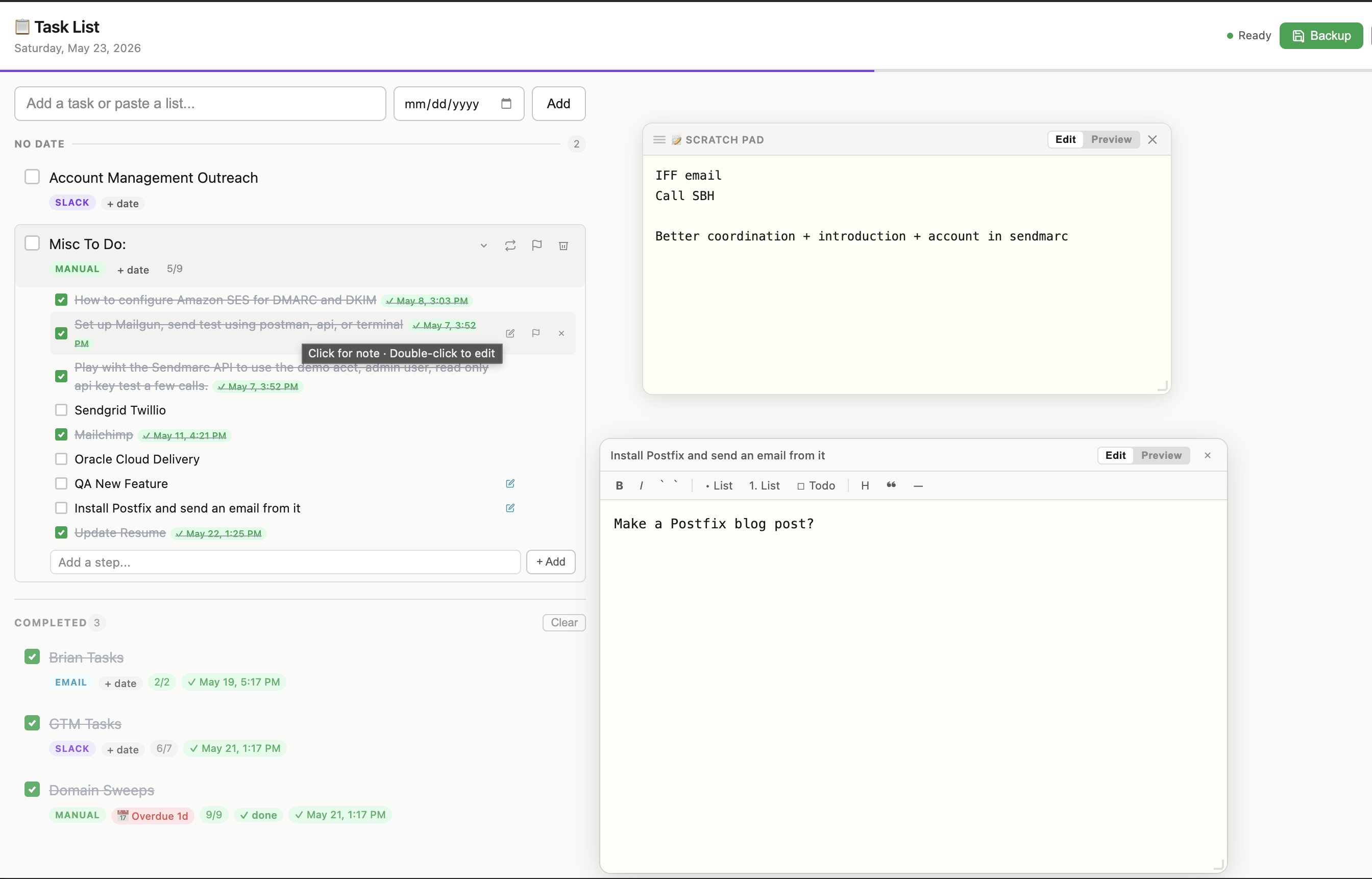
Some features really helped and others sounded useful but really weren't. This is where my process became the most valuable. What became really interesting was that the tool wasn't the only thing getting better. Every time I used it, I became better at identifying things I wanted to improve further. Small inefficiencies that I would've ignored before became so obvious once I became the architect. The value wasn't only in the tool. It was in making the distance between a problem and a solution shorter. This has been a new skill, that I never knew I would need but I would emphasize now.
API Workflows
As one would expect, my job also involves spending a lot of time inside customer accounts on the Sendmarc platform. Many of my tasks were repetitive operational actions. However, the platform already had APIs built for many of these functions.
So instead of manually doing repetitive processes over and over again, I started experimenting with API based tools.
Using API documentation and Claude, I created small tools that could
- view DMARC policies
- review sender information
- inspect RUA/RUF addresses
- validate policy changes
- double check account configurations
These definitely weren't massive engineering projects. They were small improvements reducing repetitive manual work.
Of course, security wasn't forgotten throughout the process. API keys were never shared, always given limited permissions and removed after use.
Nuance
One thing I think is important to clarify is that AI is most valuable when it improves, not when it replaces.
I still need to understand:
- DNS
- DMARC
- email authentication
- security risks
- customer environments
AI does not replace that knowledge, but, It can reduce repetitive work and shorten the time between:
- identifying a problem
- testing a solution
- improving a workflow
Really well.
That's where I've found the most value. I wasn't trying to have AI tell me what to do and regurgitate answers. I wanted to have it boost what I'm good at while helping me improve where I'm not.
Conclusion
AI has been incredibly valuable for me, not just for speeding up repetitive work, but for changing how I think about workflows entirely.
Instead of accepting that some processes are slow, I ask myself how can this be faster, better, more accurate.. Knowing I have tools to back up those questions and the answers I come up with.
Being in my early career, with so much to learn, I think these lessons and changes in the way I think has been the most valuable part of all of this.
More than improving a tool, AI has helped me learn faster, iterate toward better solutions and improve the way I work.